
 Venari Professional
Security Testing Powered by Automatic Site Mapping
Security Testing Power Tools
Venari Professional provides advanced DAST without active fuzzing — intelligent browser-based crawling, passive inspection with 20+ security rules, technology fingerprinting with CPE/CVE correlation, and workflow automation. Ideal for security teams focused on reconnaissance, passive vulnerability detection, and triage.
Unlimited Discovery Scan for Site Mapping
Map the application resources using a discovery scan to find testable areas and to scope manual test plans.
Auto-Login from Credentials
For applications with simple username/password credentials, auto-login lets the scanner operate in self-driving mode. When logouts are detected the login workflow is replayed to maintain authenticated user state.
Scan with Custom Rules
Create your own inspection and fuzzing rules to scan for vulnerabilities or custom findings in tandem with the discovery process. A flexible rule test playground enables advanced manual tests from either intercepted traffic or HTTP messages recorded during the discovery scan.
Record and Replay Workflows
Create custom workflows to describe browsing and traffic behavior to enable behavior-driven testing. These workflows can be attached to scan templates to enable testing of specific application features.
Point and Shoot API Scanning
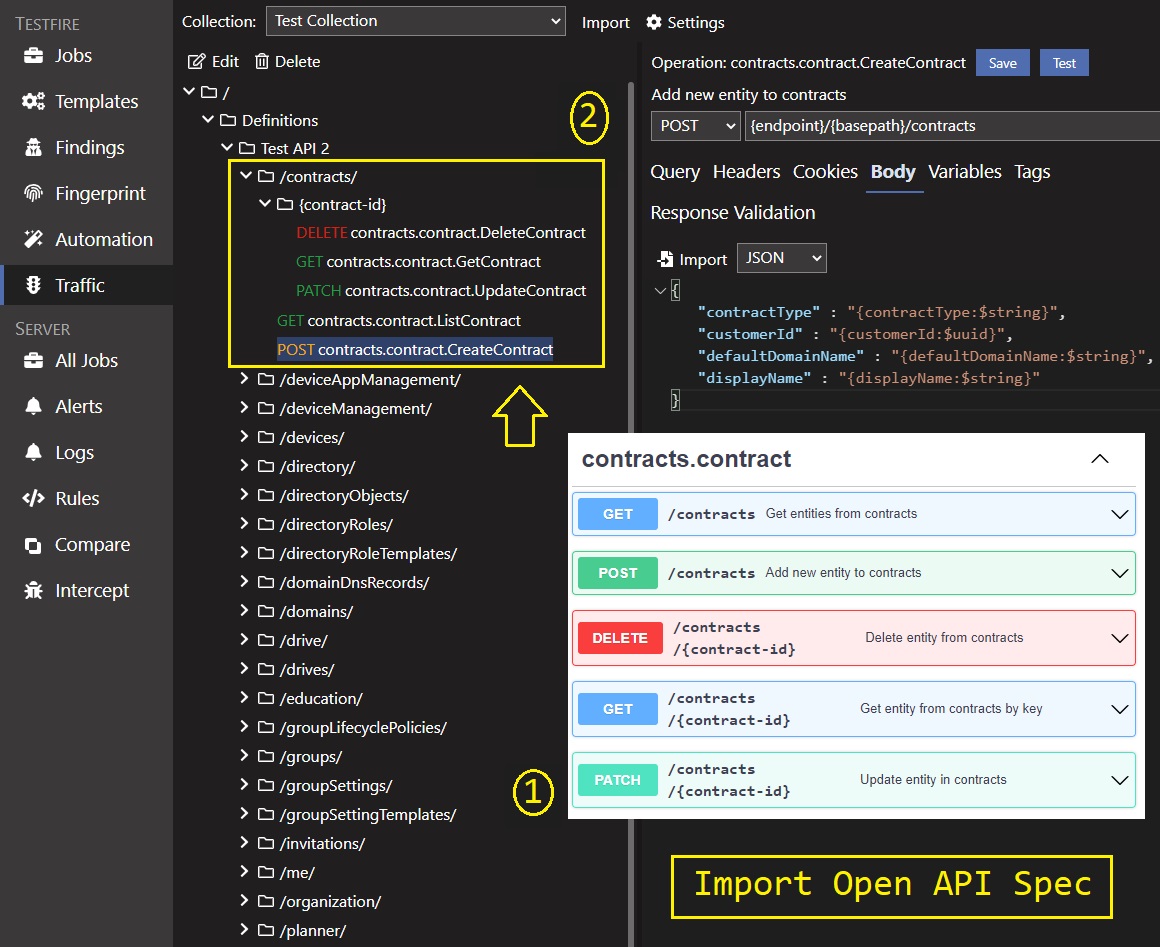
Venari Professional Edition enables simple API onboarding from Postman, OpenAPI definitions or raw traffic imports.
Import Open API (SWAGGER) Definitions
Create 'point and shoot' API scan templates by onboarding Open API definitions.
Import Postman Collections
Import Postman collections to create API scan templates.
Intercept or Import HTTP Traffic
Use the intercept panel to capture live HTTP traffic for use in scans or the interactive playground. Raw traffic collections can also be directly imported from Burp, Fiddler or HAR files.
Reports and Exports
Export findings, compliance results and detailed scan data in PDF, CSV, XML and JSON formats
Findings Report
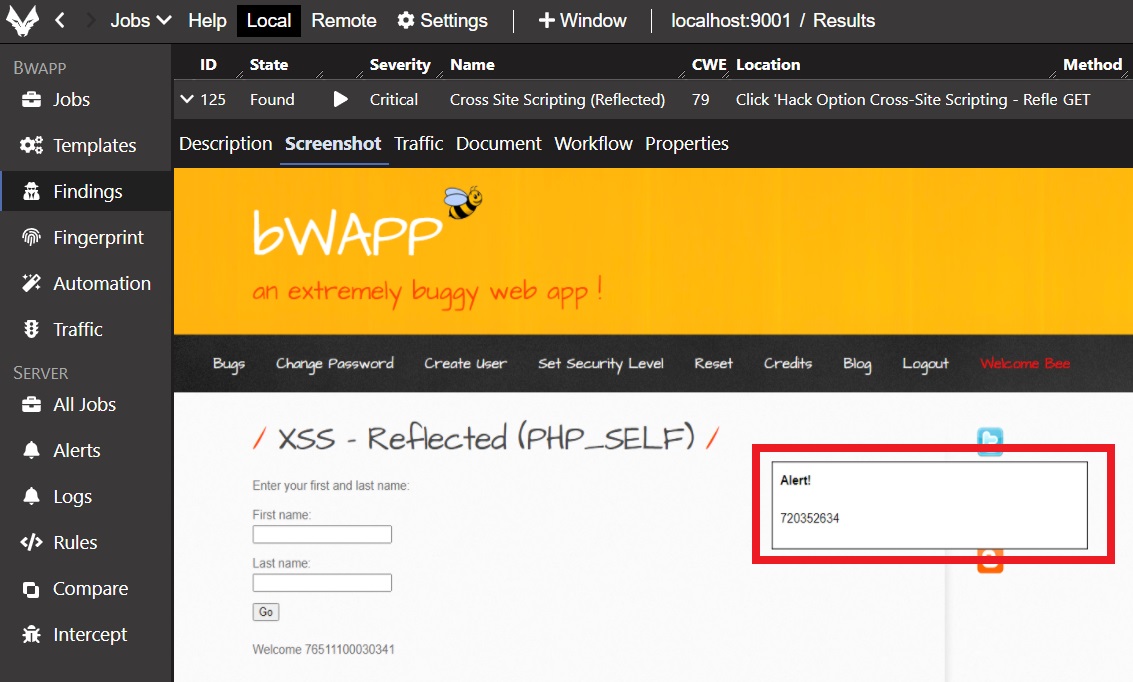
Export a PDF report with human-readable scan findings and evidence. Results are categorized by Severity and vulnerability evidence is embedded as highlighted HTTP messages and browser screen snapshots.
Compliance Report
OWASP Top 10 compliance results are mapped to specific findings and negative assessment results.
Detailed Scan Data
Findings, Mapped URLs, parameters, workflows and recorded HTTP traffic can all be exported in various data format consumable by third party tools or custom code.
Export to Findings Repositories
Findings and supporting evidence can be exported to Code DX and other third party vulnerability stores.

Burp Integration
Venari integrates with Burp Suite Pro and many other tools that generate HTTP traffic
Send Real-Time Data to Burp
Venari's Auto-Mapper plugin allows testers to launch Venari scans from inside Burp and the export traffic and issues back to Burp in real time - all while the Venari scanner maintains login state automatically.
Export Data to Burp
Use the Burp plugin to harvest scan data from Venari after a job completes.
Send Traffic to Venari
Select traffic from the Burp UI and send it to the Venari Playground for interactive testing and running security check rules
Security Defect Triage
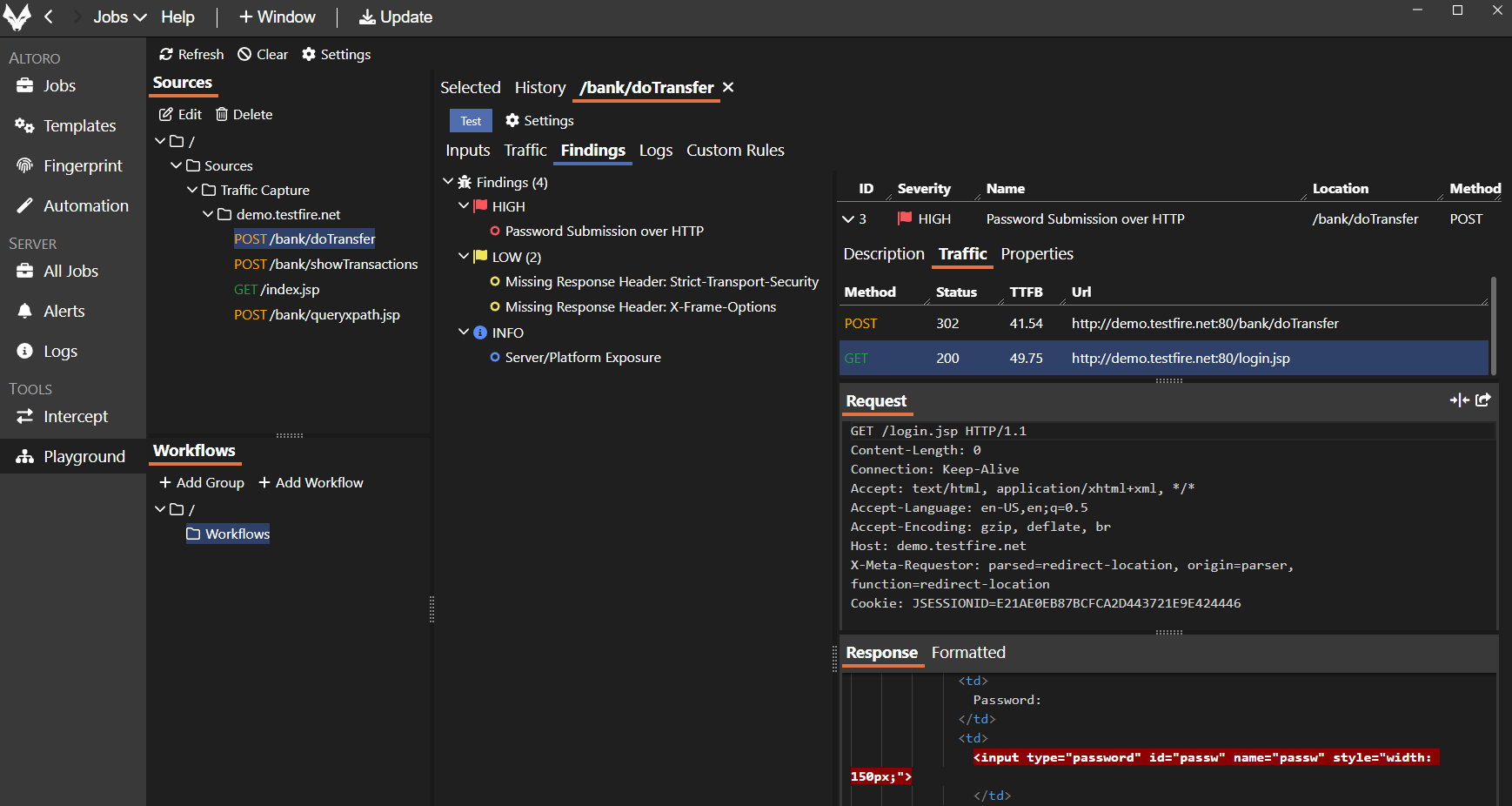
Detailed evidence views and local re-test enable rapid defect validation and documentation.
Inspect Findings Evidence
Attack traffic, browser screen captures and DOM document snapshots enable quick visual validation that a finding is accurate and relevant.
Replay and Re-test Findings Locally
Findings can be replayed on the local machine using metadata in the centralized database. Re-test can even target a different URL instance of the same application to allow testing of local deployments.
Export Supporting Evidence
Gather reports, screenshots, traffic text and other data artifacts needed as attachments in security defect tickets.
Verify Bug Fixes
Run a local re-test to validate a single fix or initiate a findings validation scan on the DevOps farm to validate all findings in a batch.
Connects AppSec Team Roles
Venari Professional Edition enables developers, QA, security specialists and IT to work seamlessly with security data.
Companion to DevOps edition
Enables remote, role-based connection to DevOps farm and provides access to application configuration and security data.
Application Onboarding
Create application workspaces and capture initial scan configurations. Optimize scan templates based on scan coverage and performance.
Integrated Triage and Re-test
Use Venari Pro on the local machine to triage bugs, validate evidence and verify fixes.

Application Data Management
Users create application workspaces with tunable settings that can be maintained over the life of the application.
Create Applications
Onboard applications with initial credentials and any special recorded workflows. Run discovery scans locally to verify login and site map coverage.
Maintain Optimal Settings
Tune template settings for faster coverage and workload reduction based on scan results. Create additional workflows as needed.
Related Documentation
Get started with Venari Professional Edition using our documentation.